
Runs entirely in your browser. Nothing to install, no account needed.
Heads-up: ΨMonkey is designed for desktop — modelling junctions works best with a mouse and a bigger screen. Feel free to look around, then come back at your desk.
Every paid PDF carries a printed report ID — Building Control can verify it in seconds.
 Watch the 22-second demo →
 Why calculate your own Ψ-values?
SAP 10 and the Home Energy Model penalise default junction Ψ-values heavily. Thermal bridging can be 20–30% of a dwelling's fabric heat loss, so swapping defaults for calculated values is often the cheapest route to a Part L pass — no spec changes, just better numbers for the details you're already building.
How it works
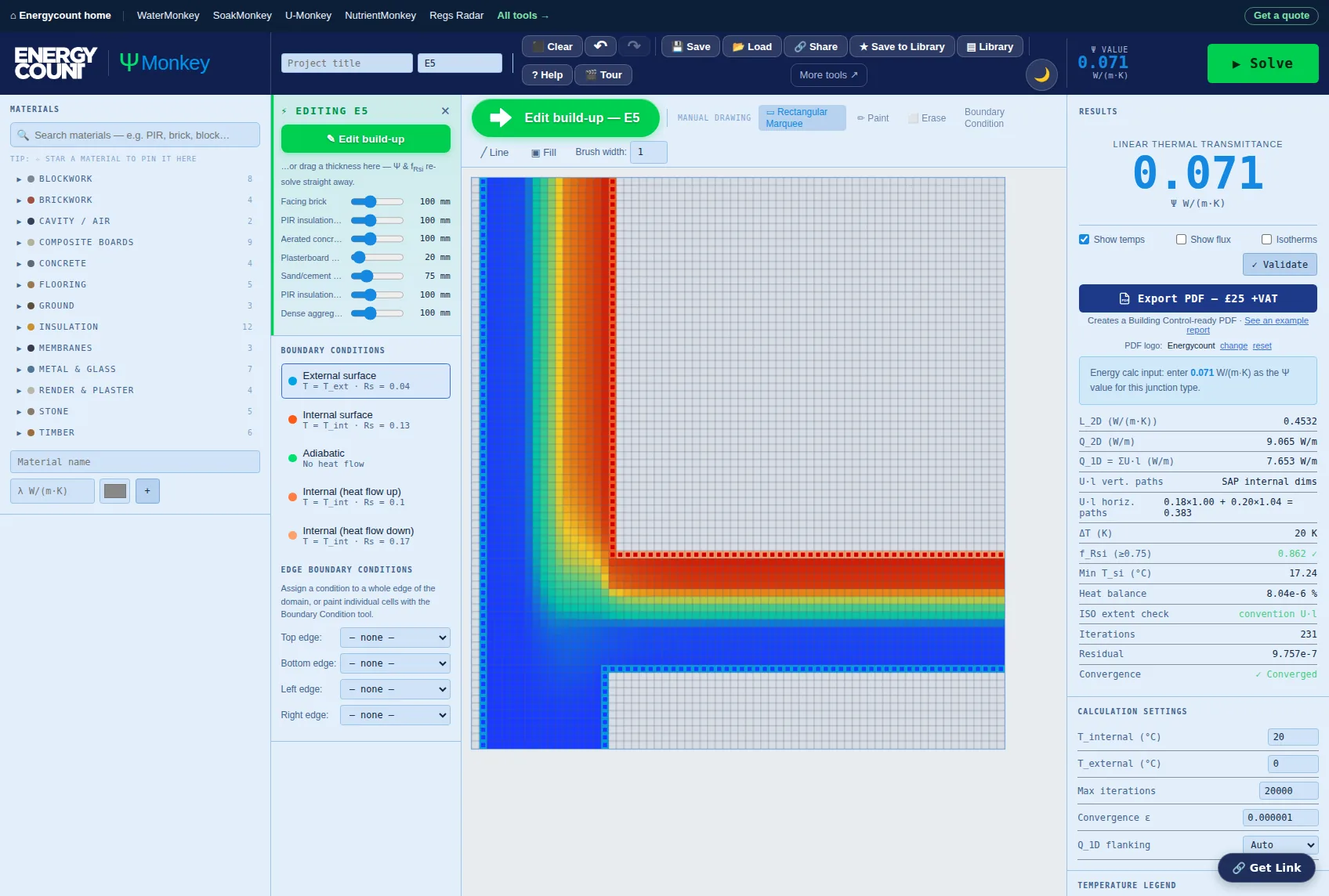
- Pick your junction — 33 ready-made SAP details: the E-series (E1–E25), party-wall P-series and roof windows (R1–R4). It draws itself, with 1 m flanking arms and surfaces already assigned.
- Set your build-up — swap materials and thicknesses in the layer list; Ψ and fRsi re-solve as you type, so you can test a spec change in seconds. Add repeating bridges (timber studs through insulation) where you need them.
- Solve — a finite-difference solver to BS EN ISO 10211 computes the full 2D temperature and heat-flux field. Not in the library? Draw any detail cell-by-cell on the grid instead.
- Export when ready — a Building Control-ready PDF report of the model, materials and results for £25 +VAT (£30 inc VAT). Re-export the same junction free for 24 hours.
New to thermal modelling? The step-by-step ΨMonkey user guide walks a whole junction through from scratch — picking the SAP detail, matching your build-up, reading Ψ and fRsi, and what to hand Building Control.
Calibrated, not just computed
Anyone can put a solver in a browser; the question is whether you can trust the number. Every built-in junction is checked against published accredited construction details — modelled on the same build-up, the standard junctions land within about ±0.02 W/m·K of the published Ψ values, across openings, floors, roofs, corners and party walls. Flanking heat loss is subtracted analytically on SAP internal dimensions (BR 497), ground floors use a modelled ground domain to BS EN ISO 13370, and every model reports its fRsi against the 0.75 condensation threshold. Edit a build-up and the 2D model, the flanking and the dimension convention all re-derive together.
Validated, and we publish the results
BS EN ISO 10211 publishes a two-dimensional test reference case precisely so that any calculation method can be checked against a known answer. ΨMonkey reproduces all nine of its reference surface temperatures to within 0.04 °C and the reference heat flow to within 0.011 W/m — the standard permits 0.1 of each. Every build runs 22 solver checks and audits all 33 junction templates; all of them pass, and you can run the same suite yourself from the ✓ Validate button inside the app.
Who it's for
SAP and HEM assessors who want better-than-default junction values; architects and designers checking details before they're built; builders and developers chasing a marginal Part L pass without spec upgrades. If you'd rather we did it, our SAP team calculates junction Ψ-values as part of full assessments.
No subscription required — pay per junction
You never have to subscribe to anything to use ΨMonkey. Model as many junctions as you like, see every Ψ-value and fRsi on screen for free, and pay £25 +VAT (£30 inc VAT) only when you export a Building Control-ready PDF. One junction per report — so a single detail costs a single fee, and you are never asked to buy a bundle to get the one value you came for.
If you produce reports regularly, Monkey Pro Unlimited at £49/month +VAT includes junction reports outright — plus the junction schedule, which exports every junction on a project as one document instead of one PDF at a time. Past two junctions a month, Unlimited is the cheaper way round; below that, pay-per-junction is, and it is never withdrawn. If all you want is your practice on the report, Monkey Pro is £10/month for the branding alone, with the junction price unchanged.
Comparing tools? Here's how ΨMonkey works as a free alternative to AutoPSI — the same BS EN ISO 10211 method, no licence and no seat count, with the Ψ-values and fRsi free on screen.
Calculate a specific junction
Guides and a calculator set up for each of the common SAP reference junctions:
- Wall-to-Floor Junction E5 / E19 / E22
- Window Jamb (Reveal) E4
- Window Sill E3
- Lintel E1 / E2
- Eaves Junction E10 / E11 / E24
- Gable Junction E12 / E13
- External Corner E16
- Inverted Corner E17
- Intermediate Floor E6 / E7
- Party Wall Junction E18 / E25 / P1–P8
- Balcony Junction E8 / E9 / E23
- Exposed Floor E20 / E21
Or start from the numbers: the standard templates are solved against eight named walls on the psi values reference page — each figure a click from the model that produced it. To see what your junctions add up to across the whole dwelling, and which ones to calculate first, use the y-value calculator. Every SAP junction reference with its Table K1 default and Table R2 notional value is on the SAP junction reference.
Frequently asked questions
What is a psi value (Ψ-value)?
A Ψ-value, or linear thermal transmittance, measures heat loss through a junction between building elements — wall-to-floor, wall-to-roof, around openings — in W/m·K. In SAP and HEM, junction lengths × Ψ-values feed directly into the dwelling heat-loss calculation.
Is ΨMonkey really free to use?
Yes. Modelling junctions, calculating Ψ-values and f_Rsi temperature factors is completely free in your browser. You only pay £25 +VAT (£30 inc VAT) when you want a PDF report for Building Control or your SAP assessor.
What calculation method does it use?
A two-dimensional finite-difference solver to BS EN ISO 10211, the standard required for calculated junction Ψ-values in SAP 10 and the Home Energy Model (HEM).
How do I know the Ψ-values are right?
Every built-in junction is a representative, buildable version of its SAP detail, and every one is re-solved and audited on each build. The solver itself reproduces test reference case 2 of BS EN ISO 10211 — the standard’s own benchmark — to within 0.04 °C on all nine reference temperatures and 0.011 W/m on heat flow, against a permitted 0.1. All 22 checks in its validation suite pass and all 33 templates are audited on every build; the full results are published at /tools/psi-calculator/validation/. Flanking heat loss is subtracted on SAP internal dimensions per BR 497, the f_Rsi temperature factor uses the BR 497 surface resistance (Rsi 0.25), and party-wall junctions are split between the two dwellings as BR 497 requires.
Has the solver been independently checked?
It is checked against the benchmark the standard itself publishes. BS EN ISO 10211 sets out a two-dimensional test reference case with nine reference surface temperatures and a reference heat flow; ΨMonkey matches all nine to within 0.04 °C and the heat flow to within 0.011 W/m, where the standard allows 0.1. It also reproduces exact analytical 1D solutions to six figures. The suite runs on every build — 22/22 pass — and you can run it yourself from the ✓ Validate button in the app. Results are published in full at /tools/psi-calculator/validation/.
Which junctions are included?
Ready-made models for 33 of the common SAP reference junctions: the E-series (E1–E25) covering openings, floors, balconies, eaves, gables, flat roofs and corners; the party-wall P-series; and roof windows plus the ridge (R1–R4). The other five are listed with the answer instead of a model — P2 and P3 are Ψ = 0 in SAP, and E19, P6 and P8 need a whole-section model no single template can stand in for. Anything else you can draw yourself on the grid.
Can I use the results in SAP or HEM assessments?
Yes — calculated Ψ-values to ISO 10211 can be used in place of default or accredited values, and almost always improve the result. The PDF report documents the model, materials and boundary conditions for Building Control.
What is the f_Rsi temperature factor?
f_Rsi indicates condensation and mould risk at the coldest internal surface of a junction. Building Regulations require f_Rsi ≥ 0.75 for dwellings. ΨMonkey calculates it automatically with every model.
Can I re-export a report after tweaking my model?
Yes — you can re-export the same junction free for 24 hours after payment. Substantial changes (a different junction) need a new report.
Can I get a refund if something goes wrong?
Yes — our refund practice is deliberately generous. An undelivered report refunds automatically, normally within the hour. If a report is faulty — it doesn't match your inputs or misapplies the stated methodology — we'll repair, replace or refund it under the Consumer Rights Act 2015, and minor corrections can be re-exported free for 24 hours after purchase.
Will Building Control accept the report?
It models the junction to BS EN ISO 10211 and shows the inputs, the calculated Ψ-value and f_Rsi, so a building control body or SAP assessor can check every line. Every paid report also carries a printed report ID that can be verified in seconds at energycount.co.uk/verify — and if anything raises a question, we're a real consultancy on 01202 623236, not just a website.
Where the method comes from
ΨMonkey models each junction numerically rather than picking a default off a list. These are the documents that define how that is done and what the answer is used for.
- Approved Document L: energy and greenhouse gas emissions (2026) Sets the thermal bridging requirement — why a psi value is needed at all, and what happens to the y-value if you fall back on defaults.
- Approved Document L: conservation of fuel and power (2021, with 2023 amendments) Still the document in force for work started under the previous standards, and the one most projects on site today are assessed against.
- Methodologies for calculating energy performance — notice of approval The formal approval of the calculation methodology behind SAP and its conventions, which is where the U-value and thermal bridging inputs end up.